

Ly link. Ly shortcut lands in your inbox, you're rolling the dice. The tiny address might promise a funny video; instead, it could be a phishing page built to (depending entirely on the context) steal your bank login.
Or a malware dropper that encrypts your files five minutes later. Learning how to identify and avoid malicious short links and phishing scams online isn't just a nice skill.
It's a survival instinct for anyone who uses email, SMS, or messaging apps. Because threat actors have turned these compact URLs into a multibillion‑dollar deception machine.
TL; DR
- Expand short links before clicking. Use free preview tools like Bitly’s “+” sign or a URL scanner to see the real destination. That one habit alone stops most credential‑theft and malware attacks cold.
- Watch for dodgy context: unexpected senders, weird typos, or long strings of random characters. But these clues aren’t foolproof so never rely on them as your only defense.
- Even a link that looks clean can be dangerous. Attackers often register fresh shorteners that fly under reputation filters, so scanning is your best bet every single time.
Key Point
- A single research study dug up 7,647 malicious short URLs among live web traffic, 4,324 of those were pure phishing pages and 3,363 delivered malware. That’s a lot of bad links floating around in everyday email and social media.
- Short links hide the final address. Traditional spam filters and URL categorizers often miss the threat because the shortener’s domain appears legitimate, while the dangerous target sits out of sight.
- The most reliable habit you can build is absurdly simple: always expand or scan the URL before you click. No exceptions, no matter how urgent the message sounds.
What Is a Malicious Short Link, Exactly?
A malicious short link is a condensed web address that redirects to a harmful site. The real destination is wrapped inside a service like Bitly, TinyURL, or a custom domain so that the visible URL gives nothing away. Attackers use this obfuscation to push the majority toward fake login screens.
Malware downloads, or data‑harvesting forms. Even well‑known shorteners get abused constantly mainly because they’re free, easy to spin up.
Offered click analytics that help criminals refine their campaigns, according to analysis by Cofense.
Why are short links such a magnet for scammers?
Does that hold up? They break the instinct we’ve all been trained to use. Checking the full address bar.
Ly/3xyZ7q” and your brain registers (which works out well in practice) it as harmless. But that string could lead anywhere.
Security researchers at Menlo Security point out that URL filtering tools struggle to categorize obscured destinations, which gives attackers a window to slip through. Plus, some shorteners let you change the target after the link has been shared, turning a safe‑looking bookmark into a phishing page days later.
Actually, let me put that differently. In reality, the bigger issue is how easily shortened links blend into rapid‑paced conversations. Ly/quick-report”, you’ll probably click before even thinking, and that split‑second reflex is exactly what attackers count on.
How Criminals Use Short Links to Trick You
Think of a short link as a mask. The real website sits behind it, invisible until you click. Ly/promo”).
Or embed them in fake shipment notifications and security alerts. Once you click, the redirect chain can shoot through multiple hops.
Scrubbing referrer information and bypassing a breeze blocklists. Industry threat reports show that some shorteners appear repeatedly in malware campaigns and credential‑phishing operations mostly since criminals can generate thousands of links in minutes and track which ones get the most clicks.
Taking a step back reveals an important factor. And the numbers back up just how widespread this is.
A 2018 APWG eCrime research paper that analyzed one dataset reported 7,647 malicious short URLs. That's not a small shift.
Breaking down into 4,324 phishing and 3,363 malware cases. In most cases, if anything, shorter links are woven even tighter into social media. And mobile messaging, giving crooks an ever‑growing attack surface.
Smart Ways to Investigate a Suspicious Link
You don’t need coding skills or expensive software. The idea is to find the real destination. Before your browser jumps there. Paste the short link into a URL scanner like Bitdefender’s free Link Checker.
Here's the other side of it. More constantly than not, the key here is that for links, or at least, created through popular shorteners, built‑in preview features can save you time. Ly link (for example. You might be wondering — why?
Ly/3xyZ7q+) to see the full target without truly there. TinyURL offers a similar preview option when you tweak the settings.
Can a short link be dangerous even if it looks normal?
Without a doubt, in”. Ly” that mimic trusted brands. Manual inspection rarely reveals anything when the surface is that polished.
The only reliable defense is to expand the link mechanically. University of Michigan’s Safe Computing team puts it bluntly: “Before clicking a shortened URL, check for the full URL.
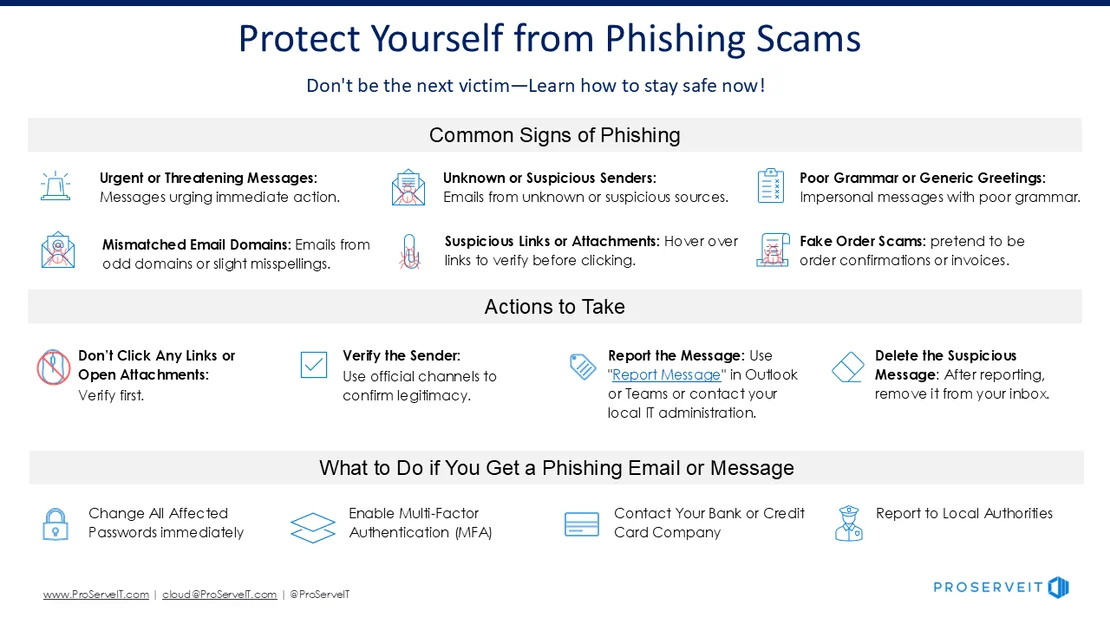
- Pause and check the sender — Look at the email address, not just the display name. Grammatical blunders or unusual urgency are red flags.
- Expand the short link — Use a URL scanner, or add “+” to Bitly links, or enable TinyURL previews. See the full destination before you click.
- Scan the expanded URL — Paste the revealed address into a free checker like Bitdefender’s tool to get a reputation verdict.
- Verify through another channel — If the link appears to come from a known sender, message them separately to confirm they sent it.
- If anything feels off, delete it — No explanation needed. Your curiosity isn’t worth a ransomware infection.
People Also Ask
What is a URL shortener scanner?
A URL shortener scanner is a free web tool that expands a short link. And checks the hidden destination against threat databases. You paste the tiny URL and it spits out the real address plus a safety rating. And bitdefender Link Checker and similar services do exactly this in seconds.
Are all short links dangerous?
Nope. Most short links are perfectly fine, used by marketers to track clicks or by regular people who want (which aligns with standard practices) to make long URLs shareable.
The danger isn’t the shortener itself, so it’s the fact that attackers hide malicious destinations behind the same services. So treat every short link as unverified until you see the real URL. This is just one piece of the puzzle.
How do I preview a Bitly link without clicking?
Ly/abc123+". That takes you to a summary page that points to the full destination and some stats — you never touch the actual target site until you decide it’s safe.
What happens if I accidentally click a phishing short link?
From a broader view, quickly close the browser tab and run a malware scan. If you entered any credentials, change those passwords immediately from a clean device. Monitor your accounts for unusual activity. In the future, use a URL scanner before clicking so you’re never caught off guard.
Can antivirus software block malicious short links?
Sometimes, but not always, and antivirus pieces often rely on blacklists that can lag behind newly created shorteners. The study that found 7,647 malicious short URLs revealed that loads of were active for hours before being flagged. That gap is exactly why manual expansion is so a big deal.
What You Should Do Next
Which means pick one method for unveiling hidden URLs and stick with (though exceptions exist, naturally) it every single time. Personally, I use the Bitly “+” trick and, for anything else, a blazing paste into Bitdefender’s scanner.
Context matters here. It adds maybe four seconds to each click. But it has saved me from more than a few landmines. That little pause is every difference between a clean machine and a disaster.
"The best shield against short link scams isn’t expensive software. It’s a one‑second expansion step that kills the mystery and keeps phishing pages where they belong: far away from your data."
Don’t let urgency drive your clicks. If an email screams “Act now. Or lose access,” that’s a flashing warning sign, not a reason to hurry. Forward the message to yourself, put it aside for five minutes; then check the link the right way.
Scammers exploit gut reactions. Break their rhythm by slowing down just enough to expand the URL.
Not always the case. That tiny habit, repeated a lot.
Makes you a much harder target. In the world of cyber threats. Being harder to exploit than the next person is a lot enough (though exceptions exist, naturally) to stay safe.
🔍 Research Sources
Verified high-authority references used for this article
- docs.apwg.org
- bitdefender.com
- cofense.com
- safecomputing.umich.edu
- blackpanda.com
- menlosecurity.com
- cyber.gov.rw
- ieeexplore.ieee.org
- scholars.csus.edu