

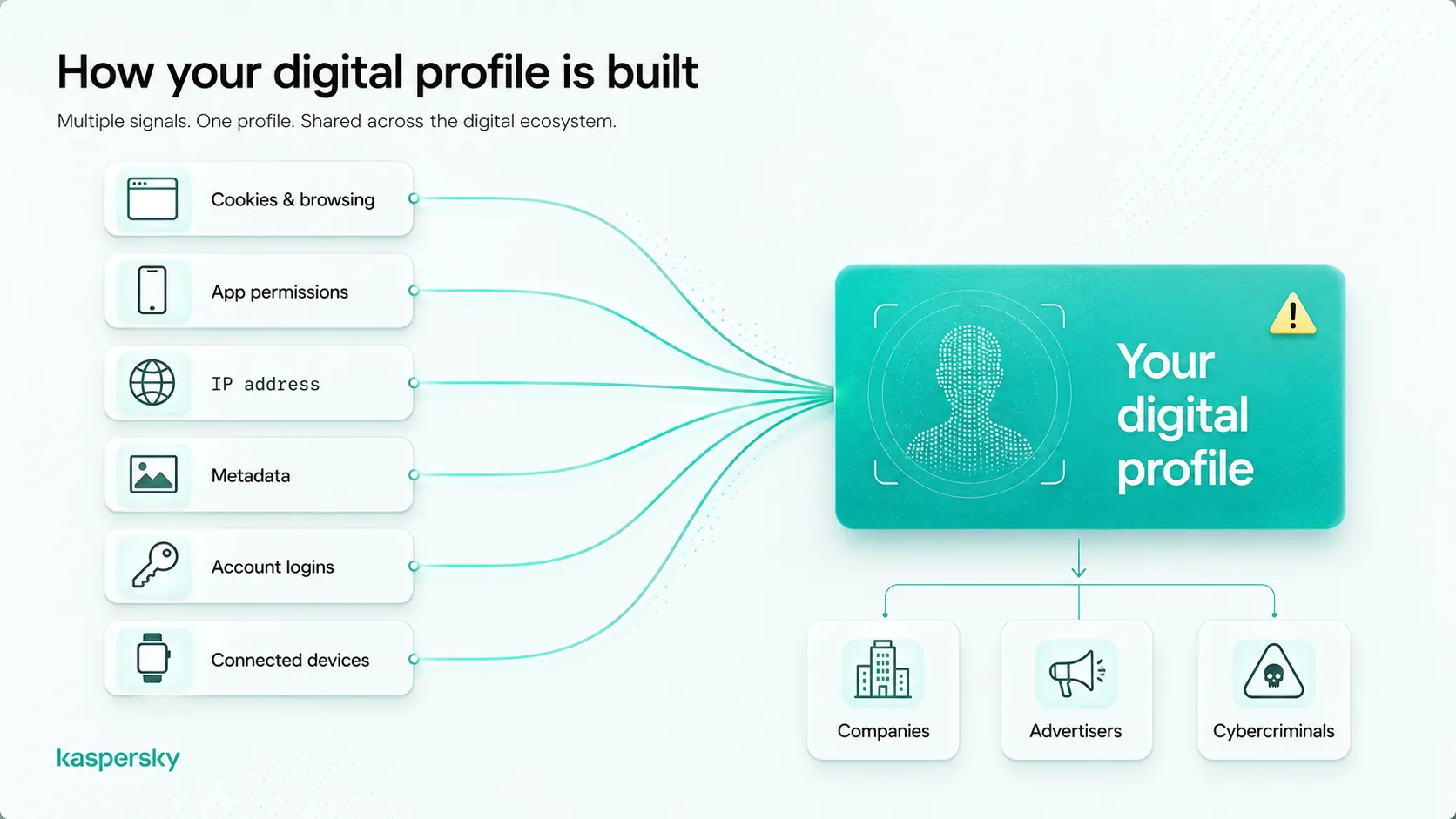
Your personal data is scattered across hundreds of servers, and you probably don't even know half of them exist. Every time you signed up for a one-off newsletter, created a throwaway gaming account.
Or let an app access your contacts, you left a trail. That trail, your digital footprint, can be a goldmine for data brokers, marketers. Cybercriminals. Cutting down that footprint isn't impossible.
You don't need to be a tech genius to do it. Truth be told, a few focused steps can dramatically shrink your exposure online. Let's walk through exactly how to reduce your digital footprint and erase your personal data from the web, one practical move at a time.
TL; DR
- Trim what you share upfront: revoke unnecessary app permissions, turn off ad tracking, and limit location to 'only while using the app' — these simple moves stop new data from leaking.
- Delete unused accounts (shopping, forums, old emails) because they store years of personal details and become easy targets in data breaches.
- Use strong, unique passwords and multi‑factor authentication on remaining accounts so that older data trails can't be hijacked by attackers.
Key Point–Permission audit: Most apps want more access than they legitimately need. Cutting back on camera, contacts, and microphone access is the fastest way to stop active data collection.
- Your old, forgotten accounts are a data liability. Shopping sites, defunct social media profiles, and gaming services often hold your payment info and address years after you stop using them.
- Think of every old login like an unlocked window. Hackers love them. So go ahead and delete accounts you haven't touched in 12 months — it slashes your attack surface immediately.
What Is a Digital Footprint?
Taking a step back reveals an important factor. A digital footprint is the trail of data you leave behind when using the internet.
Every login, location check, social post, and app interaction gets stored somewhere. It includes both active data you share intentionally (like profile photos) and passive data collected automatically (like your IP address).
Reducing it means shrinking that trail so, okay, more accurately, less of your personal life sits exposed online.
Your footprint splits into two pieces. The active part is what you give away willingly: a tweet, a commented photo, a filled-out form.
The passive part? That’s the silent stuff. Apps track your location even when you’re not opening them. Websites log your browsing history through cookies.
Most likely if you haven’t touched those settings yet, you’re bleeding data daily without realizing it.
What’s wild is how quickly it accumulates; you sign up for a pizza delivery app, grant contacts access because it asks nicely, and now the app has (and that implies quite a bit) your aunt’s phone number. Multiply that by 50 apps.
And you’ve got a sprawling network of exposed details. The first move toward shrinking your footprint is understanding that you’re feeding it constantly. And you can stop the flow.
Why You Need to Reduce Your Digital Footprint and Erase Personal Data from the Web
When your personal info spreads across leaky databases and the majority‑search sites, you risk identity theft, targeted scams, and embarrassing exposure. Even worse, once data is copied or sold. You can’t through and through pull it back. In the first place, the only real protection is to limit how much gets out.
Stick with me here; this pays off.
On average, a snappy search of your own name often pulls up deals with you haven’t lived at in a decade, phone numbers, and maybe (which aligns with standard practices) even family links. Data brokers build these profiles from public records, breached databases, and the cookies they trade. CISA’s guidance urges everyone to limit their digital footprint by being selective with social sharing. And reviewing account settings, due to the fact that that exposed information is what makes spear‑phishing emails so convincing.
Honestly, when was the last time you checked the privacy settings on your Facebook profile? Exactly.
The other side of the coin is account takeover, if an established shopping account with a weak password gets breached, attackers can pivot to your email or banking. Kaspersky’s research stresss using unique passwords and multi‑factor authentication (MFA) for exactly this reason. A single compromised account can break down years of careful privacy work. Looking closer, that’s why reducing the number of active accounts you maintain directly lowers your risk surface.
Keep in mind what we talked about earlier, but here’s the thing most guides skip. The real cost isn’t just immediate fraud. Consider this: it’s the slow burn of identity fragmentation, and honestly, over time, your data gets reassembled by marketing firms into a profile that follows you across the web.
You don’t see it. But it’s there, influencing the ads you get and even the prices you’re shown. Shrinking your footprint reclaims a chunk of that invisible agency.
A Practical Plan to Reduce Your Digital Footprint and Erase Personal Data (Step by Step)
A layered approach works best: first revoke permissions on devices and apps, then delete old accounts, then use privacy (as one might expect) resources to block new tracking. You can tackle these over a weekend. And most steps cost nothing but time.
How do I tighten app permissions on my phone?
This brings us back to what we started with, go into your phone’s settings and review every app’s access to (more on that later) location, camera, microphone. And contacts. Switch location to “only while using the app,” revoke camera and mic access for apps that don’t actually need them, and turn off Bluetooth sharing unless actively in use.
When I first ran through my own permissions, I was stunned. A flashlight app wanted my contact list.
A weather app had microphone access. Nope. ” Then open Safari’s settings.
Now flip that around. ” Android everyone can follow a similar path in the Privacy dashboard. These moves, straight from the Kaspersky 2025 checklist, clamp down on passive data harvesting. That's not a small shift.
It is up to you. Government’s CISA training also stresses limiting location access to what’s strictly necessary. It’s tedious, sure, but you’ll finish in under an hour. And that’s a huge chunk of your daily digital exhaust cut off.
What’s the deal with deleting old accounts?
Old accounts are data time bombs, so for each one you delete, you remove stored contact details, buy history. And often payment info that could leak in a breach.
From a broader view, think about that forum you joined in 2011 to ask one question. That's not a small shift.
It likely still has your email, maybe your birth date, and a weak password. Data‑privacy experts from forums like r/privacy often say combing through old shopping, gaming, and newsletter accounts is the most time‑consuming step, but (which is a critical factor) also the most rewarding. Start by typing your email address into a search engine.
You’ll unearth sites you forgot existed. Then go through password reset flows if you can’t log in, and close them, and yes, it’s a grind.
But each deletion is like boarding up a broken window. A decent chunk of the majority keep a running (which aligns with standard practices) notepad list to track progress. Because the feeling of reclaiming that old data is surprisingly satisfying.
How does my location history affect my footprint?
Your phone’s location history paints a detailed map of where you live, work, and socialize. Turning it off and deleting stored history can instantly reduce the trackable trail.
DNI/NCSC guidance gets pretty blunt about this: location data is probably the most revealing parts of your digital shadow. On Android, actually Google Maps Timeline, turn off Location History, and delete the existing logs. On iPhone, check System Services under Location Settings.
Here's the other side of it. More importantly, if you think about it, that’s a complete log of your movements — exactly the kind of thing data brokers love to piece together; after clearing mine, I noticed fewer “coincidental” ads for nearby restaurants.
You might be wondering — why? That’s not a placebo.
It’s the ad tech losing its grip. File that away.
You'll see why it matters in a bit.
Are VPNs and private browsing enough?
Under normal conditions, vPNs hide your IP and encrypt traffic. But they don’t stop apps from collecting data you voluntarily submit. Combined with other steps — they’re useful; but they aren’t a silver bullet.
Morgan Stanley’s personal‑security team suggests using a VPN to reduce network‑level tracking. Especially on public Wi‑Fi. But here’s the catch: if you log into Facebook through a VPN, Facebook still knows everything you post. The VPN shields the connection, not the content.
Actually, let’s put that more precisely, it obscures your location and ISP, but the platform’s own tracking pixels and cookies operate above that layer. So by all means, add a VPN to your kit (ProtonVPN, Mullvad, good options), but don’t let it lull you into thinking you’re invisible.
Real privacy comes from the permission‑tightening and account‑deletion work we just covered.
| Action | What It Stops | Effort Level | Immediate Impact |
|---|---|---|---|
| Revoke app permissions | Passive data collection (contacts, camera, mic) | Low | High — stops active leaks |
| Turn off ad tracking | Cross‑site profiling and device fingerprinting | Low | Medium — reduces targeted ads |
| Delete unused accounts | Breach exposure of old addresses, payment details | Medium | High — removes stored data |
| Clear location history | Movement patterns stored by Google/Apple | Low | High — erases a major trace |
| Use a VPN | ISP tracking, network‑level surveillance | Low | Medium — hides IP not activity |
- Audit all phone permissions now — go through every app and revoke camera, mic, contacts, and location access unless absolutely needed.
- Turn off ad tracking on every device — on iOS, disable “Allow Apps to Request to Track”; on Android, reset your advertising ID in Google settings.
- Delete location history everywhere — clear your Google Maps Timeline and switch location services to “While Using the App” for all non‑navigation apps.
- Close 10 old accounts this week — search your email for “welcome,” “verify,” and “unsubscribe” to find neglected logins, then delete them.
- Enable MFA on email and banking — use an authenticator app, not SMS, and store backup codes in a safe place.
People Also Ask
Can I really remove my info from data broker sites?
You can, but it’s a game of whack‑a‑mole. Most brokers (Spokeo, Whitepages, Intelius) offer opt‑out forms. And you’ll need to visit each one individually. Some services, like DeleteMe, automate the process for a fee, but even then your data can reappear later.
Persistence is key.
How long does it take to reduce my digital footprint?
A focused weekend can acquire you 80% of the way there. Permission tightening takes under an hour; account deletion depends on how a bunch of you've, so expect to spend 3–5 hours the first time, then just periodic maintenance afterward.
Will deleting my accounts stop spam emails?
Not overnight. Many lists are already sold, and spammers may keep your address for months. Yet, however, deleting the source account prevents future spam triggered by new breaches. And unsubscribing becomes easier when you’re no longer an active member.
Is it safe to use burner email addresses?
Yes, and it’s one of the smartest moves you can make. Funny enough, burner emails mask your real inbox, so if a service gets breached, the leaked email is useless to attackers, and honestly, apple’s Hide My Email and Firefox Relay are reputable free options.
What’s the first thing I should do today to protect my data?
Going back to what was covered earlier, open your phone’s privacy settings. And turn off location access for all apps that don’t need it. Then switch your default browser to one with stronger tracking protection (Firefox or Brave), so those two actions immediately shrink the passive data you leak every day.
Conclusion: What to Do When You Can’t Erase Everything
Let’s be realistic: you won’t scrub your entire past from the internet. Established cached pages; data‑broker snapshots; and copies sold to third parties will linger. That doesn’t mean your effort is wasted. By set uping the permission lockdown, deleting every account you no longer use.
And freezing your credit with the three major bureaus, you build a fortress around what remains. The data that’s still out there becomes harder to link and weaponize.
From a practical standpoint, remember that this isn’t a one‑and‑done project. Precisely. Schedule a quarterly privacy checkup, 20 minutes to re‑review app permissions. On average, small habits, like using aliased emails and refusing non‑huge permissions from the start, (though exceptions exist, naturally) turn into massive long‑term protection.
This goal isn’t perfection. It’s resilience. Now you have the exact plan to get there.
🔍 Research Sources
Verified high-authority references used for this article
- kaspersky.com
- kaspersky.com
- cisa.gov
- dni.gov
- levelblue.com
- morganstanley.com
- statefarm.com
- cmu.edu
- reddit.com
- youtube.com